Skip to Content

Welcome!

human made "AI" (advises & inputs) forum by Odoo professionals, experts and enthusiasts challenging real use cases with standard solutions!

-> solutions should be applicable for Odoo community or online (at the limit with Studio), all without custom modules.

This question has been flagged
1 Reply
72 Views

ZPL labels have formatting limitations using Barcode instead of QR codes, and sometimes some issues with alignments and overwritten information.

  • adapting views is not recommended due to documentation/traceability of changes
  • in Odoo Enterprise, it’s not possible to customize ZPL labels using Studio
  • it’s also not possible to install custom modules in Odoo SaaS

What is the best solution for all use cases?
Avatar
Discard
Author

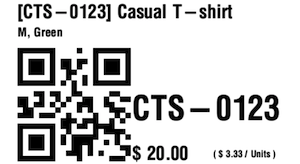
pure data module solution (using Import Module) to customize product zpl labels: 

  • taking into account product variant values, price and price-per-unit informations
  • using a large QR-code instead of a barcode
💡

Limitation:

in Odoo 19 the field zpl_template is defined with a hard-coded full list in the stock module, making it hard to add a new entry in the dropdown, so an importable module could simply replace the content of an existing template.

example of importable module replacing the "Alternative ZPL Template"

  • how to use:

    • download alternative_custom_zpl_label, enable the developer mode, go to apps and use "import module" to upload/install it
    • open any product or product variant and "Print Labels"
    • choose format "ZPL Labels" or "ZPL Labels with price"
    •  in the ZPL Template dropdown, select Alternative (2.00" x 1.00") and Print

      • the template can be set as the default template

  • If needed, this module can be uninstalled normally like any other module.
Avatar
Discard
Related Posts Replies Views Activity
1
Aug 26
99
1
Aug 26
83
1
Aug 26
166
2
Aug 26
74